
Practical GEO guides
A practical GEO optimization checklist for beginners
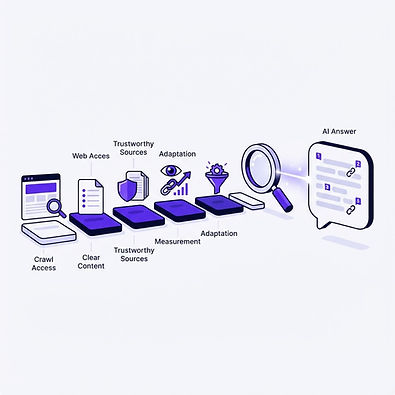
Work through six beginner steps for one page, from checking access to reviewing AI answers. Track your progress with the interactive checklist.
By GeckoCheck · Last reviewed October 12, 2026
Educational guidance, not a guarantee of AI visibility. Worked examples are explicitly illustrative or fictional, not measured assistant results.
0 of 36 completed · 0%
Before you start: choose one page and one goal
GEO means generative engine optimization: improving content so it can be discovered and used accurately in AI-generated answers. Start with one important public page, not a site-wide rewrite. Choose a real customer question and name the search or assistant surface you want to observe.
Your starting checklist:
Google says its existing SEO fundamentals apply to AI Overviews and AI Mode. No special AI schema is required. This checklist is an editorial and diagnostic workflow, not a guarantee of indexing, citation or ranking.
Evidence: Google Search Central: AI features and your website · Google Search Central: Creating helpful, reliable, people-first content
Step 1: make sure the intended public page is accessible
Done when: you have recorded the public response and relevant access or indexing evidence, with unresolved issues identified. A page working in your browser does not prove every crawler can fetch it.
Google requires supporting pages in its AI features to be indexed and eligible for a Search snippet. Other products have their own requirements. Do not expose private documents to improve discovery. Use the access and eligibility checklist for deeper diagnosis.
Evidence: Google Search Central: AI features and your website
Step 2: answer the question clearly
Done when: a reader unfamiliar with the subject can answer the original question without guessing at important conditions.
Illustrative example, not a GeckoCheck feature specification: replace “Our exports make reporting effortless” with “ExampleTool administrators on the Team plan can export completed reports as CSV.” Verify every detail before using this pattern. Clear wording helps readers and evidence review; it is not a disclosed universal citation factor.
Step 3: check the evidence behind every important claim
Done when: you can show what establishes each decision-changing claim and what it does not establish.
Google’s helpful-content guidance emphasizes original value, clear sourcing and factual accuracy. Do not add invented statistics or quotations in the hope of attracting citations. Follow the original-evidence guide if a claim requires new research rather than a wording change.
Evidence: Google Search Central: Creating helpful, reliable, people-first content
Step 4: make the page easy to find and keep facts consistent
Done when: readers can reach the page from relevant navigation and linked pages do not contradict its important claims.
Google recommends internal links, readable text, a good page experience and consistent structured data for its AI features. Do not create dozens of near-identical pages for different versions of the same question. The content-planning guide explains when a separate page is actually useful.
Evidence: Google Search Central: AI features and your website · Google Search Central: Creating helpful, reliable, people-first content
Step 5: review a small, consistent set of AI answers
Done when: someone else can understand what you asked, what appeared and whether the evidence supports the answer.
A brand mention, a citation and a referral visit are different outcomes. One favorable answer is not proof that an edit worked. Use the citation-support audit and measurement study guide when you need a repeatable evaluation.
Step 6: maintain the page and avoid beginner shortcuts
Avoid: keyword stuffing, unsupported “best” claims, changing dates without review, special-schema promises and assuming more citations mean more accurate answers.
Finish with a simple record: target page, customer question, access findings, facts verified, changes made, observation conditions and next review trigger. Describe visibility changes as observations unless the study design supports a causal conclusion. Your first milestone is a useful, accessible and verifiable page, not a guaranteed AI-search result.
Sources and methodology
Source: Google Search Central: AI features and your website · Google Search Central: Creating helpful, reliable, people-first content
Period: Reviewed October 12, 2026. Provider documentation is maintained over time; research is historical and identified by publication in each source.
Sample: Educational synthesis of the linked sources. No original observation cohort or assistant benchmark was collected for this article.
Limitation: Checklists and worked examples are GeckoCheck interpretations. Research findings apply to their studied tasks and systems; provider documentation does not guarantee citation or ranking outcomes.